
Create Consistent Characters with AI: A 5-Step Workflow

Agent analyzed your intent and is breaking down the task for you:
Why AI Characters Keep Changing
This guide shows you how to create consistent characters with ai using four levers that remove that randomness: a fixed character description, a visual reference image, consistency parameters, and quality checks.
How to Create Consistent Characters with AI in 5 Steps
Step 1: Write a Character Anchor You Never Change to create consistent characters with ai
CHARACTER ANCHOR (copy into every prompt)
Name: [unique fictional name]
Appearance: [age range, skin tone, face shape, eye color, hair color & style]
Body: [height, build, posture]
Outfit: [exact clothing, colors, materials]
Signature elements: [scar, tattoo, jewelry, weapon, accessory]
Art style: [e.g. detailed fantasy illustration, clean anime, cinematic realism]
Lighting/composition: [neutral studio lighting, plain grey background, portrait framing]
Example anchor used in this workflow: "A 28-year-old female ranger with silver hair, warm brown skin, emerald eyes and a small scar on her left brow, wearing a forest-green travel cloak over leather armor, holding a crystal-tipped wooden staff. Detailed fantasy illustration, cinematic soft light, neutral grey background, portrait framing."
Step 2: Generate a Clean Base Reference Image to create consistent characters with ai
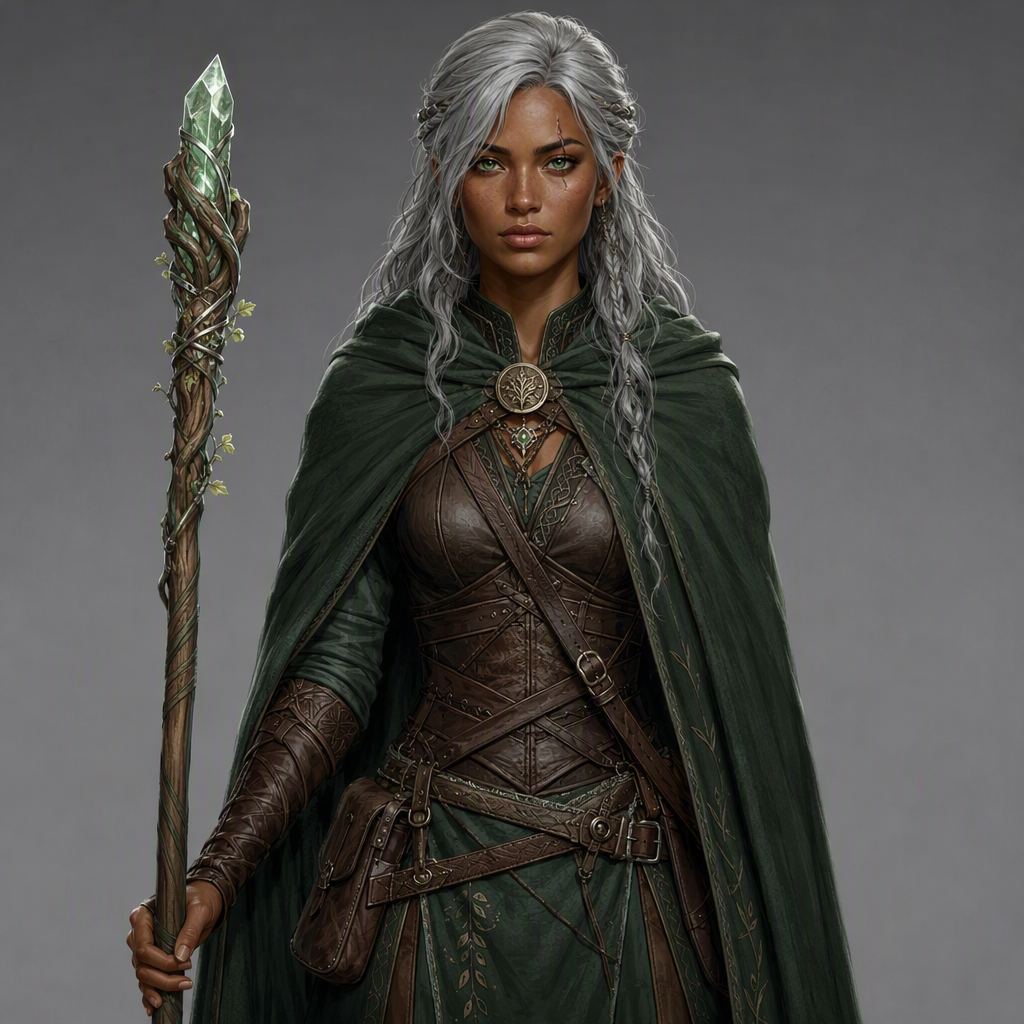
Step 3: Reuse the Reference to Create Scene Variations
Scene variation is the heart of creating consistent characters with ai: keep the reference image, change only the scene. Three proven methods:
| Method | How it works | Best for |
|---|---|---|
| Character reference (--cref/--cw) | Feeds the base image into each new prompt; --cw 0-100 controls how strictly the output copies the character | Fast scene variations in one model |
| Image-to-image / character engine | Uploads the base image; the platform extracts a facial embedding and reapplies it (e.g. Leonardo's Consistent Character Engine, Ideogram's one-photo consistency) | Platforms with built-in character features |
| Custom LoRA training | Trains a small model layer on 15-30 images of the character | Pixel-perfect identity for long projects |
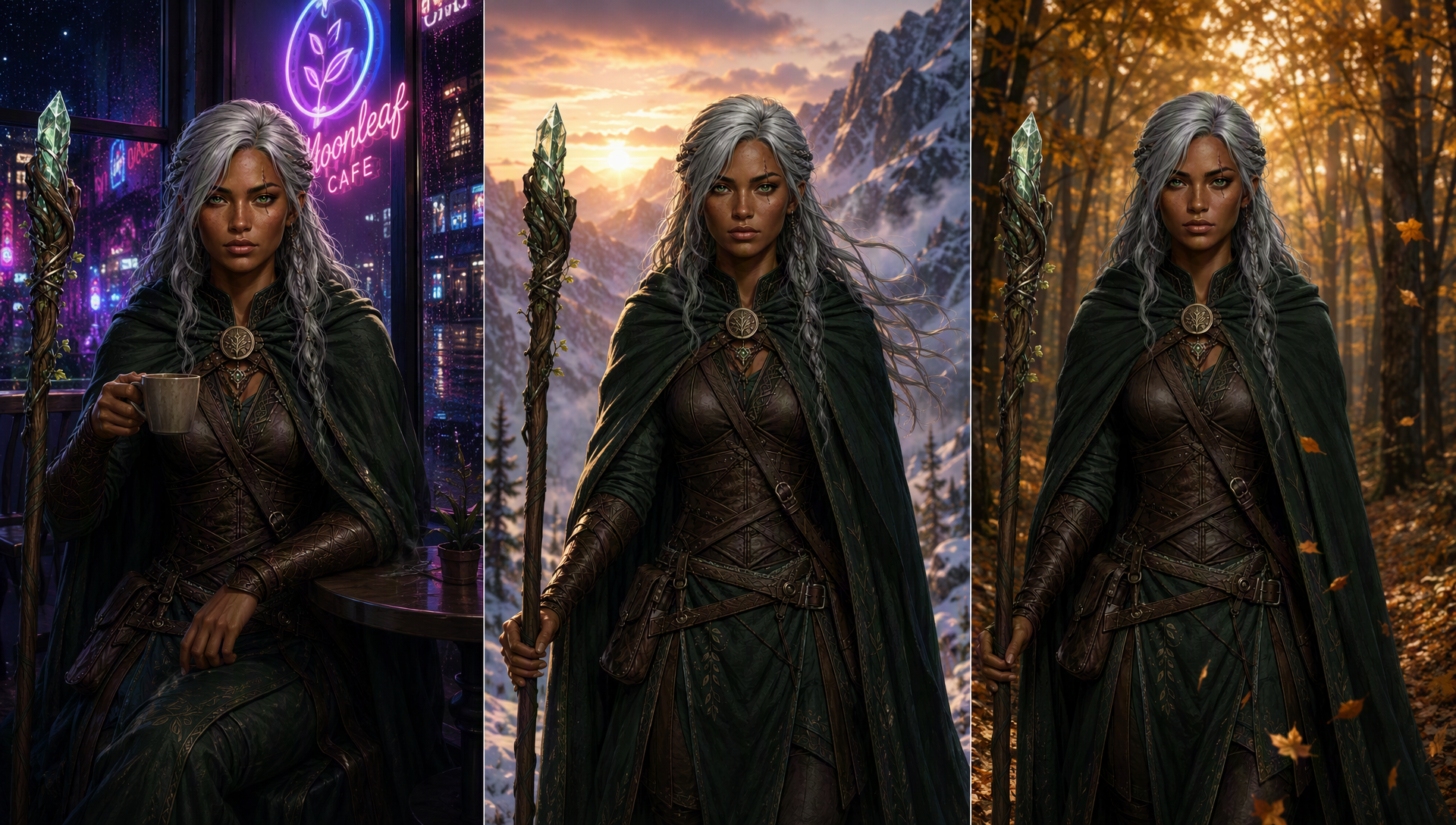
Step 4: Lock Seeds, Add Negative Prompts, and QA-Check to create consistent characters with ai
- Negative prompt — forbid drift: "different face, different hairstyle, different eye color, exaggerated features, cartoonish proportions" (Papeego recommends negative prompts to suppress unwanted variation.
- QA checklist — after each batch: same face shape? same hair? same eyes? same outfit? Zeldazon's testing shows a multi-angle reference sheet (front/side/back) pushes consistency to 90-95%. Any drift means regenerate from Step 2 — never patch a drifted image.
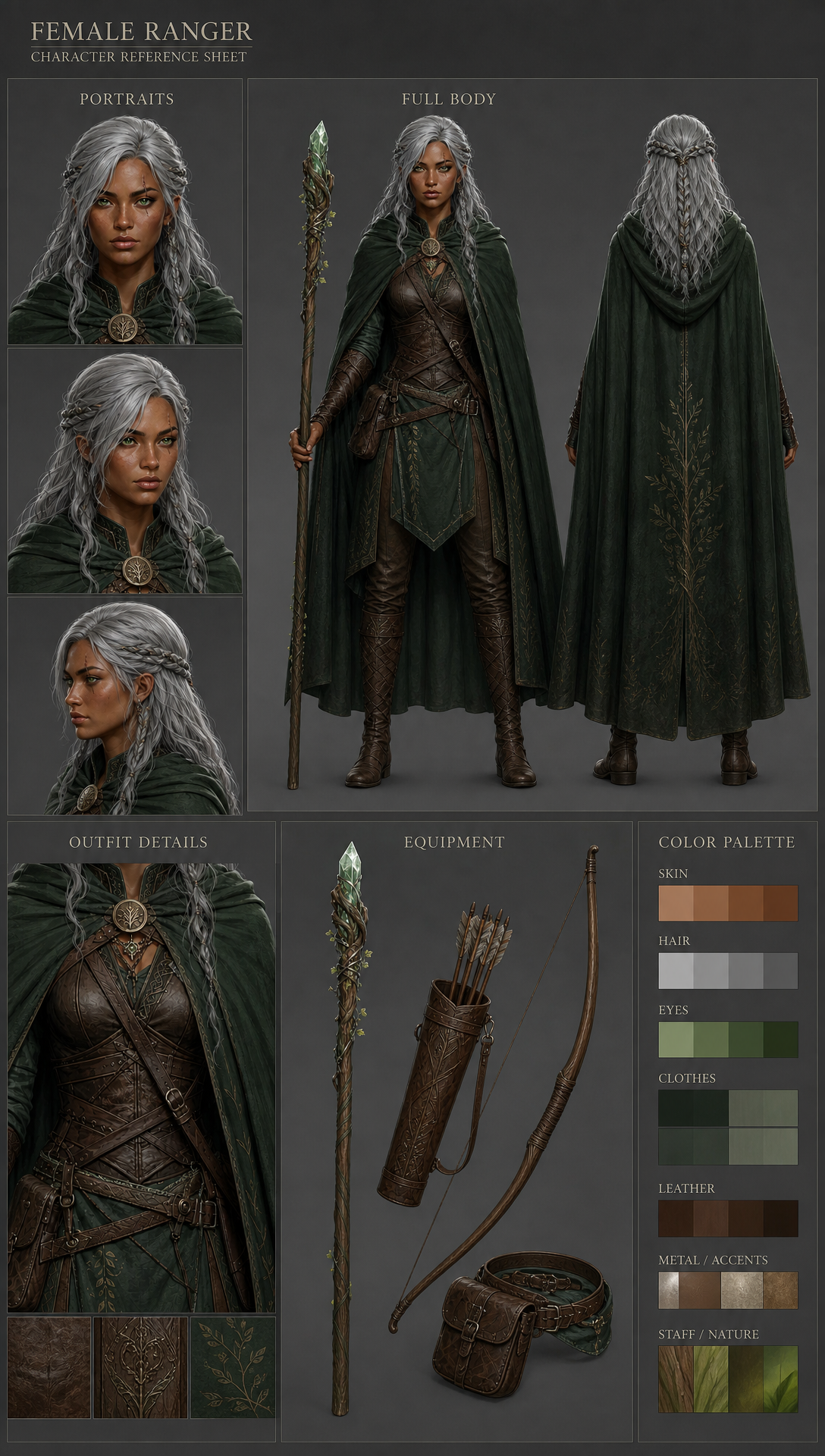
Step 5: Package a Reusable Character Kit
CHARACTER KIT — {Character Name}
- Character anchor (copy-paste description from Step 1)
- Base reference image (from Step 2) — stored URL
- 5 scene variation prompts (Step 3 template + your scenes)
- Negative prompt block (Step 4)
- QA checklist + seed log (Step 4)
Which Consistency Method Should You Use to create consistent characters with ai?
| Method | Consistency | Setup effort | Cost | Best for |
|---|---|---|---|---|
| Fixed prompt repetition | Low | None | Free | Quick experiments |
| Character reference (--cref / image-to-image) | High (~80-90%) | Low | Tool credits | Everyday scene variations |
| Dedicated consistent-character tool / Agent | High | None (built-in) | Free tier + paid | Non-engineers, high volume |
| LoRA / custom model | Highest (pixel-level) | High (technical) | GPU/time | Series, books, game pipelines |
Create Consistent Characters with AI in One Conversation
This page is an Agent template: describe your character in plain language and the Agent runs all five steps for you — writing the anchor, generating the base image, producing scene variations, applying negative prompts and the QA checklist, then handing you the complete character kit above. No parameter manuals; the templates in this guide are exactly what the Agent outputs.
Who This Is For
- Indie game developers and asset artists — producing dozens of character assets that must keep one face and one outfit, without training a model per character.
- Comic and webtoon authors — reusing the protagonist panel after panel and cutting redraw cost with copy-paste prompt templates.
- Children's book and series illustrators — keeping a character visually unified across 12-40 pages with an anchored, reference-driven workflow.
- Brand and social media creators — keeping a brand mascot or virtual host consistent across e-commerce, ads, and social content at scale.
Tips
- --cw 100 locks face, hair and outfit; --cw 0 locks only the face — drop it when you want the character in new clothing.
- Keep the base image front-facing with neutral light and a plain background; it decides the quality of everything after it.
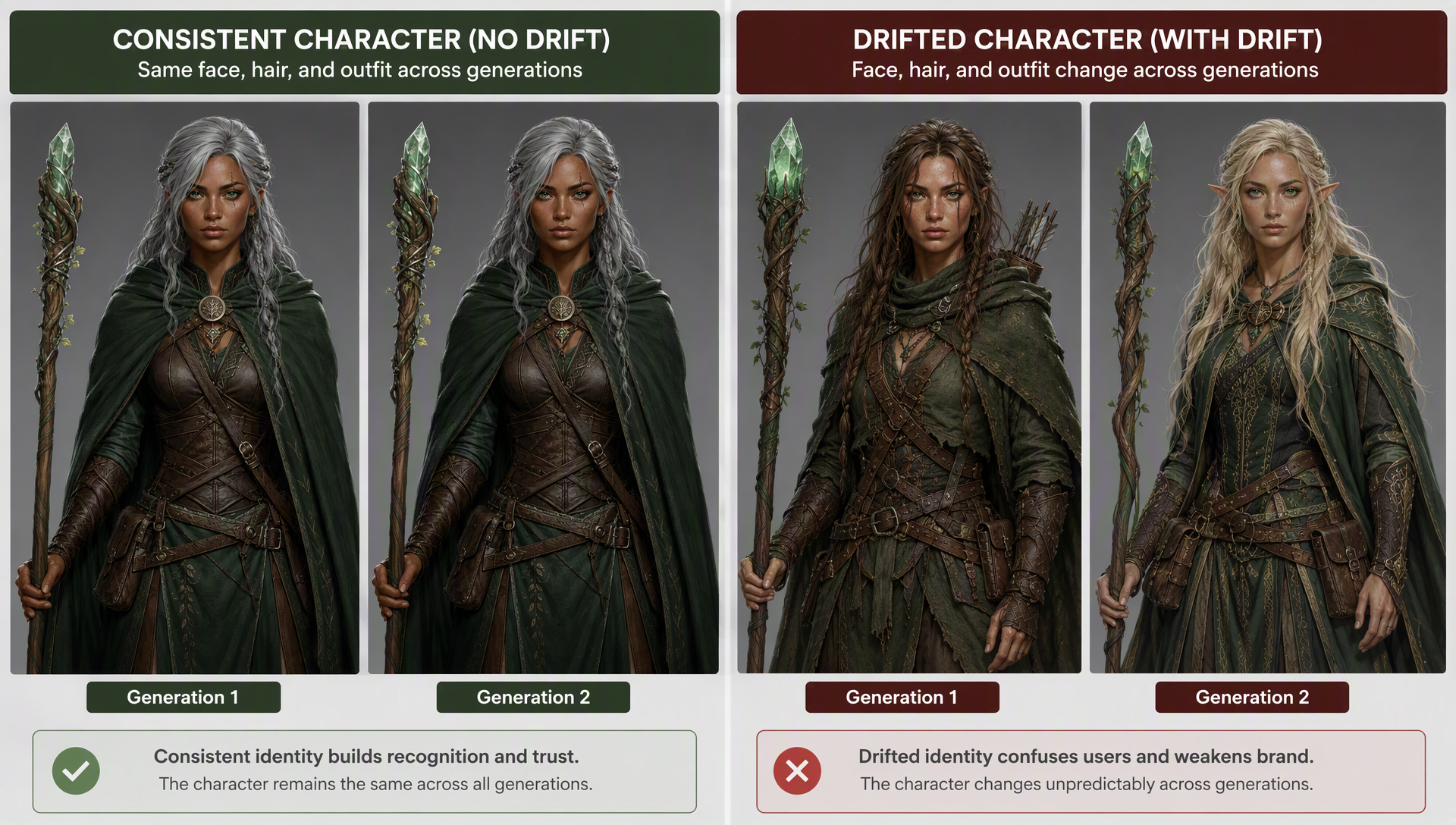
- Copy the anchor description verbatim and change only the scene — editing the character description is how drift starts.
- Use a dedicated tool or Agent that helps you create consistent characters with ai without touching parameters — less room for human error.
Limitations
- Extreme camera angles and harsh lighting still break reference methods — Knowara's 3 failures in 15 generations all happened at extreme angles; those jobs need a LoRA.
- --cref is not designed for real-photo references — Midjourney's docs note real photos tend to distort when used as character references.
- Multiple characters in one scene can contaminate each other's features — generate characters one at a time, then composite.
FAQ: Create Consistent Characters with AI
Use a five-step workflow to create consistent characters with ai: fix a written character anchor, generate one clean base reference image, reuse it with character reference (--cref or image-to-image) for scene variations, lock seeds with negative prompts, and QA-check every batch. Package the result as a reusable character kit.
Image models have no memory between generations — each prompt restarts from random noise and re-interprets your words. Small wording, lighting, or seed changes cause visible drift. A fixed character description plus a reference image is the standard fix.
Use a free consistent-character generator or a free tier with character reference (image-to-image or --cref on free credits). Combined with a character anchor and negative prompts, free tools hold roughly 80-90% consistency without LoRA training.
Usually not. Character reference methods cover most scenes at 80-90% consistency. Train a LoRA only when you need pixel-perfect identity for long series, books, or game pipelines where every frame must match exactly.
Yes. Tools like Ideogram and dedicated consistent-character generators accept one reference photo and keep that person's face across poses, outfits, and scenes — no model training required. Clean, front-facing, single-character photos give the best results.
Use --cref with your base image URL and --cw 100, keeping the character description identical in every prompt. For wardrobe changes, drop --cw toward 0 so only the face is referenced, and add --sref to keep the art style consistent.