

If you are an e-commerce brand, Shopify seller, DTC marketer, ad agency, TikTok creator, or social media manager who needs to produce more short-form ad creative without hiring a production crew, this library of UGC prompts is built for you.
The 20 templates below cover the most common AI video ad scenarios: hooks, reviews, unboxings, product launches, demos, and format-specific variations. Each one follows a tested structure, uses bracketed placeholders you can fill in for any product, and is formatted to work directly with AI video generation tools.
What Makes a UGC Prompt Work for AI Video Ads
The most common mistake when writing UGC video prompts is describing a photoshoot instead of a real moment.
A bad UGC prompt says: "Professional woman holding a skincare product, clean white background, studio lighting."
A good UGC prompt says: "28-year-old woman in her bathroom at 7am, slightly groggy, no makeup yet, holding up a serum she has been using for three weeks, talking directly into her front-facing phone camera."
The difference is specificity about the scene, the person, and the emotional context, not production quality.
Two failure modes to avoid:
Too vague: "Make a product video." The tool has no context and generates something generic that could belong to any brand.
Too polished: "Cinematic lighting, professional presenter, clean studio background." The tool produces an ad that looks like an ad, which kills the scroll-stopping effect UGC depends on.
The UGC Prompt Formula
Every template in this guide is built on one repeatable formula. Learn the parts once and you can remix any of the 20 templates for any product category.
The Formula:
Creator type + Product + Setting + First 2-second hook + Demo action + Proof point + Camera style + Lighting + Voiceover line + Caption direction + CTA + 9:16 vertical format
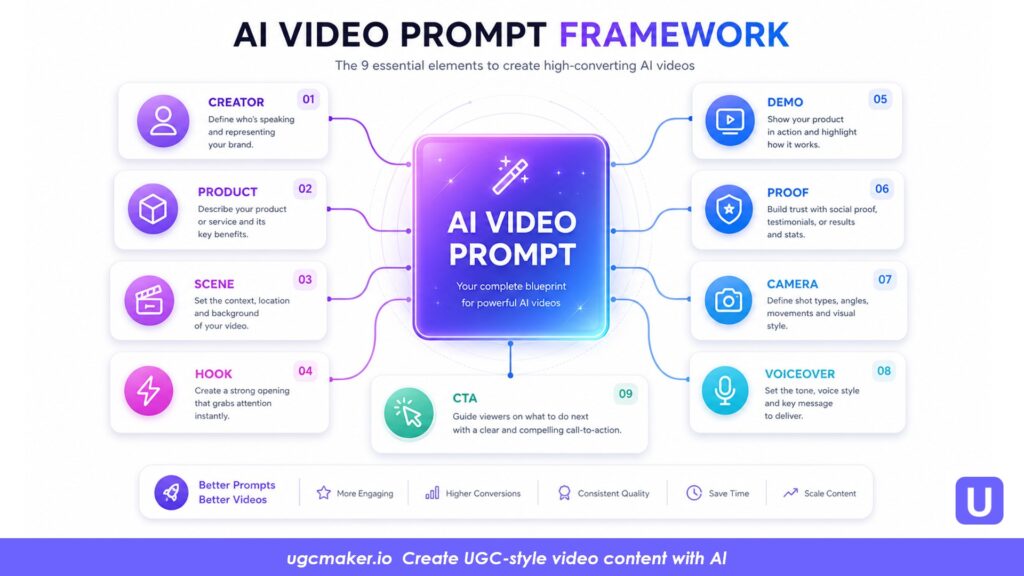
Here is what each element controls:
| Element | What it controls | Example |
| Creator type | Sets the personality and relatability of the speaker | "28-year-old mom of two" |
| Product | What the ad is about | "[Brand name] collagen powder" |
| Setting | Grounds the scene in a real location | "Kitchen counter, morning light" |
| First 2-second hook | Decides whether the viewer keeps scrolling or not | "Starts mid-sentence, eyebrows raised" |
| Demo action | Shows the product being actively used | "Scoops powder into coffee mug, stirs" |
| Proof point | Adds believability through a specific, lived detail | "Mentions she noticed a difference after 2 weeks" |
| Camera style | Sets the aesthetic and energy level | "Handheld selfie camera, slight shake" |
| Lighting | Controls how polished the output looks | "Natural window light, no ring light" |
| Voiceover line | The exact words the creator opens with | "I almost did not try this, but…" |
| Caption direction | Guides subtitle placement and style | "White captions at bottom third, 3–5 words per line" |
| CTA | What happens in the final 3 seconds | "Save this" / "Link in bio" |
| 9:16 | Platform format for TikTok, Reels, and Shorts | "1080×1920, vertical" |
Work through the formula top to bottom. Fill in every element. You will have a prompt specific enough for a tool like UGC Maker to execute into a complete video ad.
How to Use UGC Maker to Turn Prompts into Video Ads
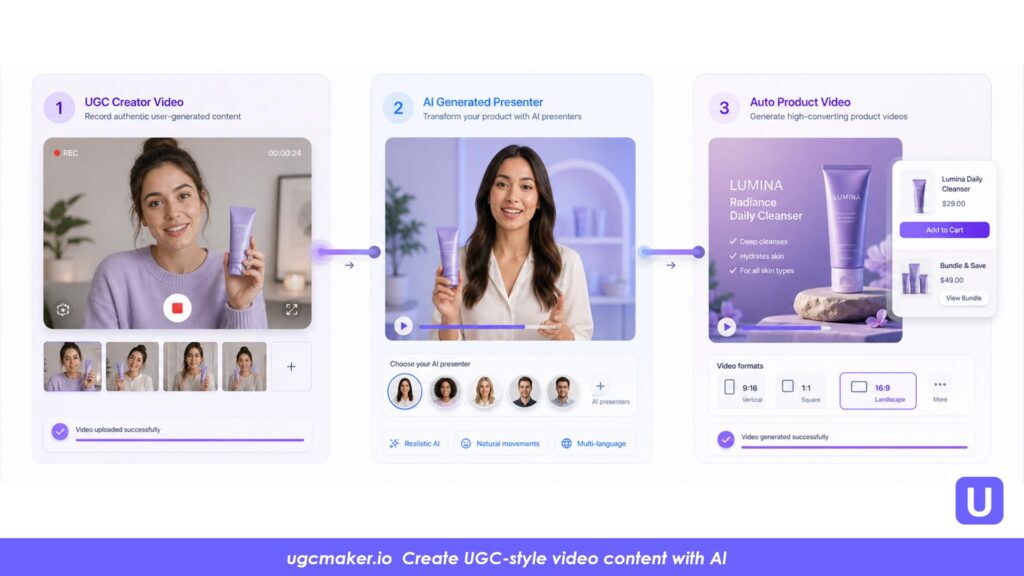
The prompts in this library describe what the video should look and feel like. UGC Maker is the platform that executes them into actual video assets. Depending on the template type, there are three main generation paths:
Path 1 — Talking-head and testimonial prompts Use AI Talking Avatar to generate a realistic creator who delivers the voiceover line, lip-synced and natural. Choose from 1,000+ avatars and 140+ voices across languages. Best for: Templates 1–8 and Template 17.
Path 2 — Product and scene prompts, faceless formats Use Marketing Studio to build the creative with your product assets, or use Product in Hand to generate photorealistic shots of a creator holding your specific product without filming. Best for: Templates 9–16, Template 18.
Path 3 — URL-based generation Paste your product page link into URL to Video and UGC Maker automatically pulls product images, writes a script, and generates a complete video. The fastest path from zero to a publishable ad. Best for: Templates 9, 10, 19, and 20.
For campaigns that use a recurring creator identity across multiple ads, use UGC Avatar to create and maintain a consistent visual character, a technique that builds parasocial recognition over time without relying on a single real creator.
20 Copy-and-Paste UGC Prompts for AI Video Ads
Replace every [bracket] with your product details before generating. Generate at least three variations per concept: one problem hook version, one curiosity hook version, and one result-first hook version.
Category 1: Hook Prompts
A hook is the first two seconds of a UGC ad. These four templates are designed to stop the scroll before the viewer has identified what the product is. Use them as standalone ad openers or combine them with any of the product-specific prompts in Category 3.
Template 1: Problem Hook
Best for: Products that solve a clear, relatable frustration. Opens with the pain before revealing the solution.
Vertical 9:16 UGC video, 1080×1920. A [age]-year-old [gender] stares into the front-facing camera with a tired, frustrated expression. Setting: [specific room, e.g. home office at night / kitchen in the morning]. First frame opens mid-sigh. Creator says out loud: "[Pain point statement, e.g. 'I was so done with [problem]']." Camera: handheld, slight shake, natural light only, no ring light. Face fills top two-thirds of frame. White caption overlays appear at bottom third, 3–4 words per line. Cut to product reveal at second 3. Casual UGC style — not a polished commercial. Total duration: 25–35 seconds.
Template 2: Curiosity Hook
Best for: Unfamiliar or visually interesting products. Creates a "wait, what is that?" opening that makes the viewer stay for the explanation.
Vertical 9:16 UGC ad, 1080×1920. Creator walks into frame holding [product] in a way that makes it partially visible but not fully identifiable. Setting: [casual location, e.g. kitchen counter / gym bag / bathroom shelf]. Creator looks directly at camera and says: "[Curiosity-driven opening line, e.g. 'Okay I need to show you what I found']." Handheld phone footage, slightly zoomed, natural lighting. Product is partially visible at second 2, full reveal at second 4. No music intro. Voiceover starts immediately. Captions: bottom third, white with thin black outline. Ends with soft CTA: "[e.g. 'Save this one']." Not polished — feels like a genuine, unplanned share. Total duration: 25–35 seconds.
Best use: Marketing Studio — build the reveal scene with your product assets and set the pacing to fast-cut.
Template 3: Result / Before-After Hook
Best for: Products with visible or measurable outcomes. Lead with the result so the viewer watches backward to understand how.
Vertical 9:16 UGC video. Creator opens by looking directly at the front-facing camera and saying: "[Result-first statement, e.g. 'Three weeks ago I could not [state before]. Now look.']" Confident tone, slight smile. Setting: [room where result is visible, e.g. bathroom mirror / gym / kitchen]. Quick 1-second cut to product at second 3. Second half of video shows the product in use or demonstrates the process. Voiceover: natural, conversational, first-person. Camera: handheld, no tripod. Lighting: window light, slightly warm. End screen: [CTA line, e.g. 'See how it works — link in bio']. White captions throughout, bottom third. Duration: 25–40 seconds. 9:16. Slightly imperfect framing is intentional.
Template 4: Contrarian Hook
Best for: Crowded categories where the viewer has heard every claim before. Opens with a statement that challenges a common assumption, then reframes it using the product.
Vertical 9:16 UGC video, 1080×1920. Creator opens facing camera with a slightly raised eyebrow and says: "[Contrarian opener, e.g. 'I know everyone says [common belief]. I used to think that too.']" Pause. Creator then picks up [product]. Setting: [relatable location where the product is typically used]. Handheld selfie-style, natural room lighting, slightly imperfect composition. Creator delivers a 15–20 second monologue in first person, conversational pacing. Voiceover ends with a reframe: "[e.g. 'Then I tried this and everything changed.']" White captions, bottom third, 4 words per line max. Ends with soft CTA. Not a commercial — feels like a friend talking on FaceTime. Duration: 25–35 seconds. 9:16.
Category 2: Review & Testimonial Prompts
Testimonial-style ads are among the highest-converting UGC formats on TikTok and Meta. These four templates cover the core variations. When writing claims for any review-style ad, use experience-based language — "I noticed," "I like," "I've been using" — rather than guaranteed outcomes. This keeps the content honest, platform-compliant, and more believable to the viewer.
Template 5: Talking-Head Product Review
Best for: Products with clear, tangible benefits a creator can describe directly. The most versatile testimonial format.
Vertical 9:16 UGC video. A [age]-year-old [creator description] sits or stands in [setting, e.g. bedroom / coffee shop / car] holding [product name] up to camera. Creator speaks directly to lens in a conversational tone. Voiceover structure: (1) "So I have been using [product] for [timeframe]" (2) "[Specific thing they noticed, e.g. 'and honestly the biggest difference I noticed was…']" (3) "[One practical detail about how they use it]" (4) "[Soft close: 'Worth trying if you…']" Camera: front-facing phone, handheld. Lighting: natural, slightly warm. Background: lived-in, not staged. Captions: white auto-captions, bottom third. Duration: 25–35 seconds. 9:16. Casual UGC style — not a brand commercial.
Template 6: "I Noticed" Testimonial Ad
Best for: Health, wellness, beauty, and supplement products. A softer, experience-first format that avoids outcome-guarantee language while still communicating real benefit.
Vertical 9:16 UGC video. Creator (age: [X], appearance: [description]) sits in [setting, e.g. living room sofa with morning light]. Creator opens with: "[Time-anchored opener, e.g. 'So it has been about [X] weeks since I started using [product]']." Delivers 3 specific "I noticed" observations in a relaxed tone: "[Observation 1]," "[Observation 2]," "[Observation 3]." Holds product up at second 10. No dramatic music. No before-after transformation claims. Natural pacing, occasional filler word ("um," "like") for realism. Captions: white, bottom third, 3–5 words per line. Ends with: "[Soft CTA, e.g. 'Leaving a link in case you want to check it out']." Handheld selfie camera. 9:16, natural window light. Feels like a voice note with video. Duration: 30–40 seconds.
Compliance note: Do not include guaranteed health or medical outcome claims. Keep all statements personal and experiential. Review your product category's advertising guidelines before publishing.
Template 7: Comparison / Switch Ad
Best for: Products entering a crowded category or replacing a common solution. "Why I switched from X to Y" is one of the most clicked UGC formats because it validates the viewer's existing skepticism.
Vertical 9:16 UGC video. Creator opens on camera and says: "[Switch opener, e.g. 'I have been using [old solution category] for years. I finally switched and here is why.']" Setting: [relevant location, e.g. bathroom shelf / gym bag / kitchen]. Creator briefly mentions old situation (no competitor brand names needed), then introduces [product]. Gives 2–3 specific differences they noticed. Shows product in use for 5–8 seconds. Ends with: "[Close, e.g. 'Not going back.']" Camera: handheld, phone-quality footage feel. Lighting: natural. Background: real environment, not a set. Captions: white auto-caps, bottom third. Duration: 25–40 seconds. 9:16. Authentic, slightly imperfect framing is intentional.
Best use: Marketing Studio for side-by-side product comparison visuals.
Template 8: User Reaction / Surprise Reveal
Best for: Products with strong packaging, sensory qualities, or immediate first-use impact. Works especially well for unboxings, new arrivals, and products that look better in person than in photos.
Vertical 9:16 UGC video. Creator films themselves opening [product] or using it for the first time on camera. Setting: [natural location, e.g. living room floor, kitchen counter]. Opening shot: product in sealed packaging or box in hand. Creator reacts genuinely as they open or first use it — genuine surprise expression, not exaggerated. Highlights: [2 specific product details that are visually impressive, e.g. packaging quality / texture / scent reaction / functionality]. Creator says: "[Reaction line, e.g. 'Okay I did not expect this']." Handheld footage, natural light, no script-reading energy. Captions: bottom third, white. CTA at end: "[e.g. 'This is it for me']." Duration: 20–30 seconds. 9:16. Imperfect, raw feel — not a studio unboxing.
Category 3: Product-Specific Prompts
These seven templates are tuned for specific product categories. Each one includes the sensory cues, visual details, or emotional beats that tend to perform best for that type of product.
Template 9: Unboxing UGC Ad
Best for: Physical products where packaging, quality, and the first-touch experience are part of the value. Emphasizes tactile and visual details.
Vertical 9:16 UGC video. Creator films the unboxing of [product name] from the buyer's point of view. Opens with the sealed package in hand — delivered to the door or placed on a table. Creator narrates naturally: "[Opening line, e.g. 'Okay it finally arrived, let me show you what came']." Camera close-up on: outer packaging, box opening motion, product reveal inside. Highlight [2 specific tactile or visual details, e.g. packaging material / tissue paper / product finish / weight of item]. Creator reacts as they handle the product for the first time. No professional lighting rig — use natural window light or overhead room light. Slight camera shake, handheld close-up shots. Captions: auto-style, bottom third. Ends with product visible and CTA: "[e.g. 'Linked below']." 9:16, 30–45 seconds. Phone footage quality throughout.
Template 10: Product Launch Ad
Best for: New product releases, restocks, or limited editions. Works as a pre-launch teaser or launch-day announcement. Energy should be excited but grounded — not overhyped.
Vertical 9:16 UGC video, product launch style. Creator opens holding [product] partially hidden behind their back or inside a closed box. First 2 seconds: creator looks at camera and says: "[Launch opener, e.g. 'It is finally here']" or "[Teaser line, e.g. 'I have been waiting to show you this for weeks']." Reveals product at second 3–4. Creator briefly explains: what it is, the one problem it solves, and what makes this version or launch different. Visual emphasis on product details: [material / color / key feature]. Ends with urgency-light CTA: "[e.g. 'Now live — link in bio' / 'Early access is open']." Lighting: warm, natural. Handheld. White captions, bottom third, clean. Duration: 20–30 seconds. 9:16. Real person energy — excited but not over-rehearsed.
Template 11: Beauty / Skincare Demo
Best for: Skincare, makeup, haircare, or personal care products where application and texture are part of the product's appeal.
Vertical 9:16 UGC video. Creator (age: [X], skin type: [description]) films in [bathroom / vanity area] with natural morning light. Opens with product in hand, cap off. Shows: [application step, e.g. pump / drop / squeeze]. Close-up of product texture as it is applied to skin. Creator talks through their routine naturally: "[e.g. 'I have been using this in my morning routine for [timeframe] and here is what I have noticed']." Mentions 2–3 sensory details: [texture word / scent note / skin feel after]. No medical or clinical outcome claims. Ends with post-application close-up in natural light. Captions: bottom third, white. CTA: "[e.g. 'This is my current holy grail']." Handheld, phone quality. Duration: 30–45 seconds. 9:16.
Compliance note: Use experiential, first-person language only. Do not make guaranteed skin-improvement claims.
Template 12: Fashion Try-On
Best for: Clothing, shoes, and accessories. The fit-check format is the most organically performing style in fashion UGC because it is what real people already post.
Vertical 9:16 UGC video. Creator films a fit-check style try-on of [clothing item / accessory]. Opens with creator off-camera saying: "[e.g. 'Okay, new [product type] — let me show you']." Creator enters frame and shows 3 angles: front, side, slight turn. Natural movement — not posed modeling. Camera: handheld, held by creator or placed on shelf at a slight angle. Lighting: bedroom or natural outdoor light. Creator narrates: fabric feel, sizing note (e.g. "I am usually a [size] and got a [size]"), one styling idea. Ends with: "[Close, e.g. 'This one is staying in the rotation']." Captions: positioned to avoid covering the outfit. Soft background music optional, low volume. 9:16, 20–30 seconds. Real room, real person — not a studio walkthrough.
Template 13: Food & Beverage UGC
Best for: Food products, drinks, snacks, supplements in drink form, or any consumable with sensory appeal. Focus on pour, texture, and genuine taste reaction.
Vertical 9:16 UGC video. Opens with close-up of [product] being prepared or poured: [e.g. coffee pour / packet tear / bottle open / snack poured into bowl]. Creator's hands visible throughout; no face required in the first half. Camera: overhead or slight angle close-up, handheld. Natural kitchen lighting. Second half: creator takes a first bite or sip and reacts genuinely. Creator says: "[Sensory reaction, e.g. 'Okay the [specific flavor / texture detail] is actually insane']." Voiceover: 1–2 product facts woven into casual commentary. Captions: white, bottom third. CTA: "[e.g. 'I cannot stop ordering this']." Background: real kitchen or table, not a restaurant set. Duration: 20–30 seconds. 9:16.
Template 14: Gadget & Tech Demo
Best for: Consumer tech, home gadgets, and productivity tools. Show a specific real-world problem being solved — one task, one clear before-and-after moment.
Vertical 9:16 UGC video. Creator in [real-use setting, e.g. home office / car / bedroom] opens with the problem: "[e.g. 'I have been dealing with [specific issue] for months']." Briefly shows the situation without the product. Introduces [product] at second 5. Demo: walks through exactly one key use case, hands-on, no feature list. Camera: handheld, switches between selfie and rear-facing for product close-ups. Highlights: [one specific feature shown in action — show it, do not just name it]. Creator delivers one proof point: "[e.g. 'I have been using it for [X] weeks and [specific observation]']." Ends with CTA: "[e.g. 'This is the one']." Captions: bottom third, white, clean. Duration: 30–45 seconds. 9:16. Real environment — not a staged tech demo setup.
Template 15: App / SaaS Walkthrough
Best for: Digital products, apps, SaaS tools, or browser extensions. Show one task being completed in under 30 seconds. One job done — not a feature tour.
Vertical 9:16 UGC video. Creator holds phone or sits at laptop. Opens with the task: "[e.g. 'I needed to [specific task] and it was taking me forever']." Switches to screen close-up showing [product/app] in use. Walks through 3 taps or clicks maximum. Shows the completed result at second 20. Creator reacts: "[e.g. 'Done in 2 minutes']." Returns to creator face for the close. Voiceover: conversational, first-person, no feature-marketing language. Captions: bottom third, white. CTA: "[e.g. 'Free to try — link below']." Duration: 20–30 seconds. 9:16. No screen recording watermarks, no notification banners. Feels like a friend showing you something on their phone — not a tutorial video.
Category 4: Format-Based Prompts
These three templates are defined by their output format or duration rather than their product type. Use them when you need a specific ad structure regardless of what you are selling.
Template 16: Faceless UGC Ad
Best for: Brands that do not want to anchor their identity to a single creator face, or products where the close-up detail is more compelling than a talking head. Shows hands, product, and environment — no face required.
Vertical 9:16 UGC video, faceless format. No creator face appears at any point. Opens with [product] being picked up by a hand from [surface, e.g. bathroom shelf / desk / kitchen counter]. Camera: first-person POV or product close-up angle, handheld. Sequence: (1) Product in hand, label or key detail visible — 3 seconds (2) Product being used or opened — 5 seconds (3) Result close-up or key feature visible — 5 seconds (4) Product set back down, text overlay appears All visuals: tight close-up, warm natural light, real surfaces. Text overlay: [key benefit line in bold, e.g. "3 weeks. This is what changed."] Captions for any voiceover: bottom third. Background music: lo-fi or soft ambient, low volume. CTA: text overlay at end — "[e.g. 'Shop now — link in bio']." Duration: 18–25 seconds. 9:16. Polished-imperfect aesthetic.
Template 17: 15-Second Hook + CTA
Best for: Paid ad creative for retargeting audiences who already know the brand. Maximum impact in minimum time. No room for setup — start with the claim and end with the action.
Vertical 9:16 UGC ad, exactly 15 seconds. Structure: Seconds 0–4 — Hook: Creator looks at camera and delivers one powerful opening line: "[e.g. 'This is the only [product category] I actually use now']." Seconds 5–11 — Demo: 2–3 quick cuts of product in use, real environment. No transition effects. Seconds 12–15 — CTA: Creator back on camera or text overlay: "[e.g. 'Link below, you are welcome']." Camera: handheld selfie for hook and CTA, rear-facing for demo cuts. Lighting: consistent natural light throughout. Captions: bottom third across all 15 seconds. No music intro, no logo intro, no end card. Starts and ends immediately. 9:16, 1080×1920. Feels like a 3-sentence recommendation from a friend.
Template 18: Fitness / Outdoor Product UGC
Best for: Activewear, fitness equipment, outdoor gear, pre-workouts, and supplements used during exercise. Show the product in its natural performance context.
Vertical 9:16 UGC video. Creator in [setting, e.g. home gym / outdoor trail / living room floor] already mid-activity or mid-workout. Product is visible from the first frame — [worn / used / carried]. Creator pauses and addresses camera: "[e.g. 'Quick thing about [product] — I have been using it for [timeframe] and here is what I actually think']." Delivers 2 honest observations. No guaranteed transformation or performance claims. Physical demonstration: [specific movement or use case that shows the product in action]. Ends with: "[Soft CTA, e.g. 'Genuinely one of the better [product category] I have tried']." Camera: action-style, slightly unstable, natural outdoor or gym light. Captions: bottom third, white bold. Duration: 25–35 seconds. 9:16.
Compliance note: Avoid guaranteed physical or performance outcome claims. Keep all language experiential and personal.
Category 5: Testing & Variation Prompts
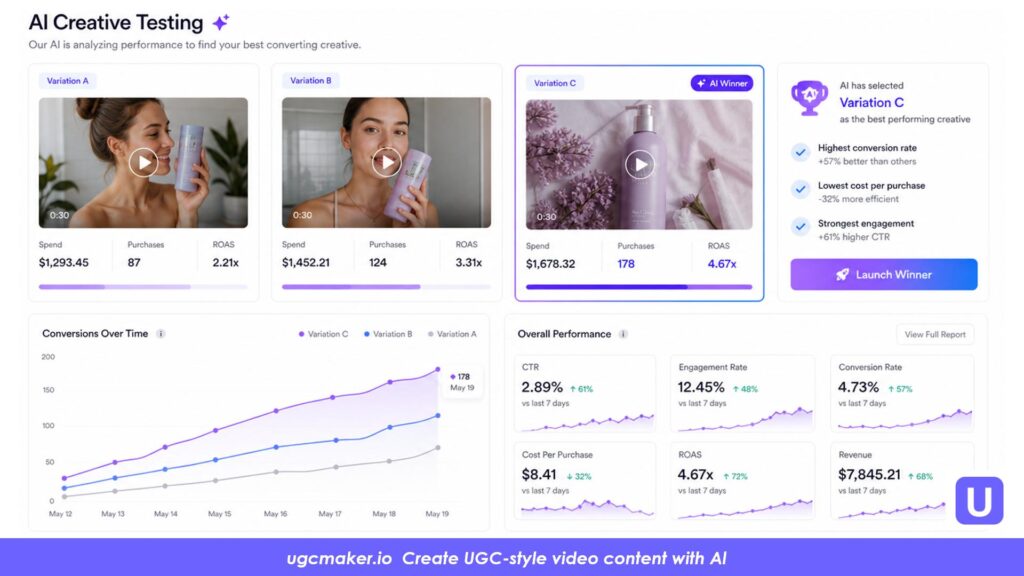
These two templates are designed for systematic A/B testing. Rather than building a new creative from scratch each time, they hold the middle of the video constant and swap only the variable being tested — the hook or the CTA. This isolates what actually drives performance differences.
Template 19: Hook Variation Test Set
Best for: Any product where you are unsure which ad angle will resonate. Test three hook types with the same demo and proof point. Only the first 3–4 seconds change.
Generate three separate versions using the structure below. Keep the middle segment identical across all three.
Vertical 9:16 UGC video, 25–30 seconds. Creator: [description]. Product: [product name]. Setting: [location]. Camera: handheld selfie, natural light. Captions: bottom third throughout. CTA at end (identical across all versions): "[your standard CTA]." Middle section (seconds 4–22, identical in all versions): [describe the demo action and proof point here]. Change only the first 3–4 seconds: VERSION A — Problem Hook: Creator opens mid-frustration: "[Problem statement said out loud, e.g. 'I was so tired of dealing with [pain point]']." VERSION B — Curiosity Hook: Creator holds product partially hidden: "[Curiosity-driven line, e.g. 'Okay I need to show you what I just found']." VERSION C — Result Hook: Creator opens with the result already stated: "[Result-first statement, e.g. 'I have not had [problem] once in the last [timeframe]']."
Run all three versions as separate ad sets targeting the same audience with the same budget. Pause the lowest-CTR version at 48 hours. Scale the winner.
Best use: Marketing Studio generate all three hook variations in one session without rebuilding the creative from scratch each time.
Template 20: CTA Variation Test Set
Best for: Products with audiences at different funnel stages. Test three CTA intensities — awareness, education, conversion — matched to cold, warm, and retargeting audiences respectively.
Vertical 9:16 UGC video. Identical content in all three versions through second 22. Creator: [description]. Product: [product name]. Setting: [location]. Hook: [use any hook from Templates 1–4]. Demo and proof point: [consistent middle section, same in all versions]. Change only the final 4–5 seconds: VERSION A — Soft CTA (Cold audience / awareness): "[e.g. 'Save this for later if you are curious']." or "[e.g. 'Worth looking into']." VERSION B — Educational CTA (Warm audience / consideration): "[e.g. 'See exactly how it works — link in bio']." or "[e.g. 'Full breakdown linked below']." VERSION C — Direct CTA (Retargeting / conversion): "[e.g. 'Get yours — link below']." or "[e.g. 'Available now, link in bio']."
Match Version A to cold interest audiences, Version B to video viewers and engaged users, Version C to site visitors and cart abandoners.
Quick Workflow: From UGC Prompt to Published Ad
Step 1 — Choose your angle. Decide which ad format fits the product and campaign goal: unboxing, testimonial, demo, product launch, hook-only, or faceless.
Step 2 — Pick the matching template. Select from the 20 templates above based on your angle and product category.
Step 3 — Fill in the brackets. Replace every [placeholder] with your specific product name, creator description, setting, pain point, voiceover line, and CTA.
Step 4 — Generate at least 3 variations. Use Template 19 to create a hook variation set, or Template 20 to create a CTA variation set from the same base video.
Step 5 — Review before publishing. Check: Is the product visible in the first 2 seconds? Are captions readable on a phone screen? Is the voiceover language experiential rather than outcome-guaranteed? Does the CTA match the audience's funnel stage?
Step 6 — Export and adapt. Apply the platform-specific adjustments from the previous section before exporting.
Step 7 — Run, measure, and iterate. Pause the lowest-CTR version at 48 hours. Scale the highest-performing hook. Use the winning angle as the starting point for your next prompt.
Frequently Asked Questions
What should UGC prompts for AI video ads include?
At minimum, a strong UGC prompt should include: who the creator is (age and brief description), what the product is, where the scene takes place, what happens in the first 2 seconds, what demo action is shown, one proof point or lived experience detail, the camera style (handheld selfie recommended), the lighting (natural preferred), a caption direction, a CTA, and a 9:16 aspect ratio.
What is the best UGC prompt for TikTok ads?
The highest-performing TikTok UGC prompts have the product visible by second 2, use a problem hook or curiosity hook as the opener, show the product being actively used within 5 seconds, and end with a soft CTA rather than a hard sell. Specify handheld camera, natural lighting, and bottom-third captions.
How many UGC prompt variations should I generate per concept?
Generate at least three variations per concept: one problem hook version, one curiosity hook version, and one result-first hook version. If you are also testing CTAs, run a second set of three with the same middle section and different endings.
Can I use these UGC prompts with UGC Maker?
Yes. The templates in this guide are structured to work directly with UGC Maker. Use AI Talking Avatar for creator-facing testimonial and review formats. Use Product in Hand for faceless and unboxing formats. Use URL to Video to generate a complete video from a product page link. Use Marketing Studio for full creative builds and multi-variation sessions.
Do AI-generated UGC ads guarantee conversions?
No. AI-generated UGC ads help you produce and test more creative variations faster and at lower cost than traditional production. Performance still depends on the offer, the audience, the platform, the product, and how well the creative matches all of those variables.
Are there compliance rules for AI-generated testimonials?
Yes. FTC guidelines explicitly address AI-generated and fabricated testimonials in advertising. Do not present a fictional AI-generated creator as a verified real customer who used and endorses the product. Do not make claims the product cannot actually support. Use experience-based language ("I noticed," "I like," "I have been using") rather than guaranteed-outcome language. Disclose AI-generated content where platform policies require it.